Construction daily log app
A construction daily log app your foremen write from the job
Appello's job notes let the crew post updates and photos from the phone, tag the right person in the office and keep every reply on the job. It is live today for insulation, mechanical, HVAC, plumbing, sheet metal, electrical, concrete and other ICI trade contractors, and notes written without signal post when the phone reconnects.

App screens use a fictional sample company.
Your daily log is already written. It's just in six places.
A daily log answers the same questions every day. In Appello, each answer is already captured by the work itself. Here is where each line of the log lives.
Work done today
Job notes
The foreman's note: title, description and up to 15 photos or files, posted from the phone. More
Who was on site, and for how long
Time clock and timesheets
Clock-ins on the job, with the hours that go to payroll. No headcount to type twice. More
Site photos
Note attachments
Take Photo or Choose from Library, kept with the note on the job instead of in a camera roll.
Problems and questions
Notes, @mentions and RFIs
Tag the project manager on the note. If it needs the consultant, raise an RFI from the same job. More
Weather, deliveries, visitors
A form you build
If your GC wants the same boxes every day, build a daily report once and attach it to the job. More
Appello doesn't ship a fixed daily report template. The notes feed is the running log; a set-format report is a form you build. For the paper-to-tablet switch itself, read how to replace paper daily reports with an iPad.
One wet steam line, from the mezzanine to the office
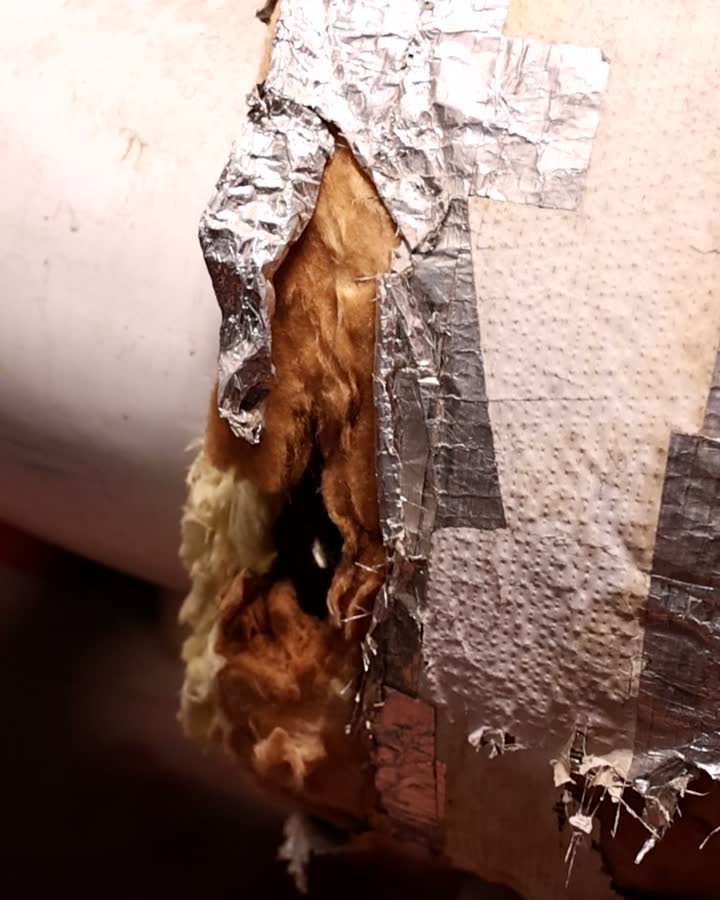
Footage from a real customer job.
- 1
Posted from the mezzanine
M. Tremblay finds wet insulation on the 6-inch steam line. He writes a note on the job, takes two photos and tags the project manager.
- 2
On the PM's phone
K. Fitzgerald gets a push notification: you were mentioned. The note and both photos open on the job.
- 3
A reply on the same note
Fitzgerald comments: cut it out, replace it, log the time against the change. The reply sits under the note, not in a text thread.
- 4
Part of the job's record
The note stays in the job's feed beside the job details. Weeks later, anyone allowed on the job can find it, and print it with the photos.
- If the fix is extra work, the next stop is a change order, priced from the same job. Sample names from the fictional Northline storyline.
Written in the truck. Readable in the boardroom.
Foremen write the way they talk, with their thumbs. Rewrite with AI sits in the note's toolbar on the phone and on the web. One tap turns a rough note into a clear one, or translates it to French, Spanish or English for a mixed crew or a Quebec job.
The writer sees the rewrite and decides whether to keep it, so the facts stay theirs. It needs a connection; offline, the button hides and the note posts as typed.
Note Title
Mech room 3B: chilled water lines done
Note Description
An illustrative example on the sample job. Real output varies, and the writer decides whether to keep it before the note posts.
Estimator site-visit notes · partly there
Walk-through photos before the job exists
Estimators walk the site before there is a job to post on. Appello doesn't have a separate estimator walk-through flow yet, so here is exactly what works today. On the web, notes and photos can go on the customer's company, the contact or the project, so the walk-through sits with the opportunity it belongs to. On the phone, notes with photos go on a project, a job, a piece of equipment or a material order.
An estimator can start the project in Appello during the bid and keep the walk-through notes on it; when the work is won, the jobs are set up under that same project. The estimate itself is built in sales & estimating.
“I love having this dashboard of all our projects. It's like my little command center. I don't know how I would do it any other way to be honest.”
 Darren Sloan, President, All Temp30% less administrative overheadRead the case study
A week of notes, summed up for the GC
Claude, ChatGPT, Microsoft Copilot and Grok can read the job's notes through the Appello connector, limited to what your Appello role allows. The AI drafts; a person reads it and sends it. You can delegate the work, but not the responsibility for it.
- 1
“Summarize every note on Lakeshore General this week, as a draft update for the general contractor.”
search_notes
- 2
“What did Tremblay report about the damaged insulation, and what did the office say back?”
get_note · search_comments
- 3
“Post a note on 26-014-01 that lift 0147 is down until Thursday.”
create_note
- 4
“Which notes from the field this week mention the steam line?”
search_notes
Questions project managers ask
Is there a daily report template?
Not as a fixed template. In Appello, the job's notes feed is the running daily log: who wrote what, when, with photos and replies. If your general contractor wants a set-format daily report with the same questions every day, build it once in the form builder and attach it to the job. Then it shows on the crew's phone as a form to fill.
How many photos can a foreman add to a note?
Up to 15 attachments at a time, from the phone's camera with Take Photo or from the photo library. Files work too. The photos stay with the note on the job, so the office, the project manager and anyone else allowed to see the job sees them in the same place, not in someone's camera roll.
Does it work without signal?
Yes, in the mobile app. A note written in a basement or on a roof without signal, photos included, is kept on the phone and posted when it reconnects. Rewrite with AI is the exception: it needs a connection, so the button hides while the phone is offline. The web app in the office needs Wi-Fi.
Can the office write notes the crew doesn't see?
Yes. Every note has a Visible to everyone or Hidden from Mobile setting. A new note is visible by default; switch it to Hidden from Mobile and it drops out of the crew's note feed in the app. Use it for pricing talk, a customer dispute or anything that belongs in the office. You can change it later from the note's Actions menu.
Who gets notified about a note?
The people you tag. Type @ to tag a person, a group or Everyone, and they get an in-app notification and a push notification on their phone, plus a text message if your company has texting set up. Appello doesn't email notes. On the web, people with permission can also see who has opened a note.
Can I send notes to the general contractor?
One at a time, as a PDF. Open a note, choose Actions, then Print, and tick Include Attachments and Include Comments if you want the photos and replies. Save it as a PDF or print it. There's no bulk export of a week's notes; for a weekly summary, ask your AI assistant to draft one from the notes and read it before you send it.
Can foremen dictate notes?
Appello has no built-in dictation or voice-to-text. Many foremen use the microphone key on their phone's keyboard, which types what they say into the note like any other text. Then Rewrite with AI can tidy it up into a more professional note, or translate it to French, Spanish or English, before it posts.
Post a note from site, live
In the demo, write a note on a phone with a photo and an @mention, and watch it land on the job in the office.
Walk through a job in a demoA working session on your own week: your crews, your payroll rules, your jobs. Pricing for your team size afterwards.
- I have one problem to fix firstSee every modulePick the problem in front of you (payroll, scheduling, job cost, billing) and see the screens that handle it.
- I want the big pictureSee how Appello connects AIHow your operations data, your integrations and assistants like Claude and ChatGPT fit together.
- I want a quick benchmarkScore your operationSix minutes, five scored areas, and a report you keep, whether or not you ever book a demo.
Comments, @mentions & seen-by
Tag the person who has to act. Know they saw it.
@ a person, a group or Everyone
Type @ in the note to tag the project manager, the estimating group or the whole company. Tagged people get an in-app notification and a push on their phone, and a text if your company has texting set up. Notes are never emailed.
Replies stay on the note
Add Comment starts a thread under the note. The question, the answer and the photos sit together on the job, so the next person who opens it reads the whole story instead of a forwarded screenshot.
Seen by, on the web
People with the Can See Who Has Seen permission get a list of who has opened each note. When a foreman asks whether the office read it, the answer is one click away. Pin Note keeps an important one at the top of the feed.
Some notes aren't for the crew. Set a note to Hidden from Mobile and it drops out of the field's note feed, while everyone in the office still sees it on the job.