Crew notification app for construction
The right buzz, on the right phone
Appello tells people when something needs them: a timesheet sent back, a note they're tagged in, a form to sign, a worker who clocked in outside the fence. It arrives in the bell, as a push to the Appello app and, with your own Twilio number, as a text. Schedule changes don't send a notification, and this page says what does.
Appello · Timesheet rejectednow
Week of Sep 7: Thursday hours missing a cost code. Fix and resubmit.
Appello · Tagged in a notenow
M. Tremblay: Gate B locked until 7:30, park in the north lot. 26-014-01
Appello · Announcementnow
Huron Unit 3: Saturday shutdown starts 6:00 AM. Bring FR clothing.
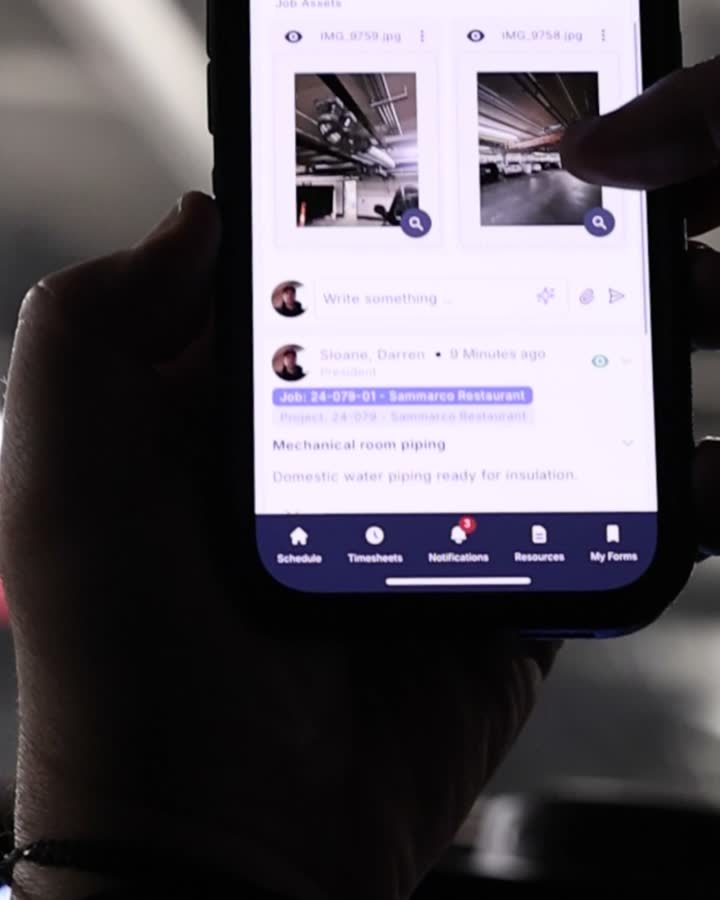
Footage from a real customer job. Notifications are coded examples with a fictional sample company.
Four channels, and how far each one reaches
Bell
In the web app, top right. A red count, unread and all, and a click opens the job, timesheet or document. It refreshes about every ten seconds.
Push
To the Appello mobile app on iPhone and Android. It follows the bell's setting for each type, so turning one off turns off both.
SMS
From your own Twilio number, once an admin connects it. Then any type can also go out as a text, company-wide or per person.
Only form submissions: an admin can add people to the email each submission sends. Otherwise Appello emails what a person sends, such as an RFI or a PO.
The notification ledger
Every event that sends a notification, and where it goes
This is the whole list. If an event isn't here, it doesn't notify anyone. Nearly all go to the bell and the phone, SMS needs your Twilio number, and only form submissions can also arrive by email.
| Event | Who gets it | Bell | Phone push | SMS (Twilio) | |
|---|---|---|---|---|---|
| Timesheet approved / rejected | The worker | On | — | ||
| Leave submitted | Assigned approversAdmin assigns | On | — | ||
| Leave approved / rejected | The worker | On | — | ||
| Expense submitted | Assigned approversAdmin assigns | On | — | ||
| Expense approved / rejected | The worker | On | — | ||
| Supplier bill (AP) submitted | Assigned approversAdmin assigns | On | — | ||
| Supplier bill (AP) approved / rejected | The person who submitted it | On | — |
| Event | Who gets it | Bell | Phone push | SMS (Twilio) | |
|---|---|---|---|---|---|
| Tagged in a note, or a reply on your note | The people tagged or on the thread | On | — | ||
| New note created | Assigned peopleAdmin assigns | On | — | ||
| Form submitted | Assigned peopleAdmin assigns | Off until turned on | To assigned people | ||
| Form or note to acknowledge | The person asked to acknowledge | On | — | ||
| Mentioned in a document comment | The person mentioned | On | — | ||
| Document to sign / signature requested / completed | The signer, then the sender | On | — | ||
| Announcement to mobile, or to web and mobile | Everyone on that app | On | — | ||
| Announcement to web only | Everyone on the web app | — | On | — |
| Event | Who gets it | Bell | Phone push | SMS (Twilio) | |
|---|---|---|---|---|---|
| Job created | Assigned peopleAdmin assigns | On | — | ||
| Worker entered / left the job site | People assigned on that job | On | — | ||
| Clocked in outside the geofence | People assigned on that job | On | — | ||
| RFI sent | The RFI's assignee | Off until turned on | — | ||
| RFI response submitted | The RFI's assignee and sender | On | — | ||
| Work order created / submitted | Assigned peopleAdmin assigns | Off until turned on | — |
| Event | Who gets it | Bell | Phone push | SMS (Twilio) | |
|---|---|---|---|---|---|
| Maintenance coming due / overdue | The person assigned to the schedule | On | — | ||
| Stock running low | Assigned peopleAdmin assigns | On | — | ||
| New hire onboarding submitted / approved / completed | Assigned peopleAdmin assigns | — | On | — | |
| QuickBooks timesheet export finished / failed | The person who ran it | On | — |
“Admin assigns” types go only to the users or user groups an admin picks, and people can't switch them off. Geofence alerts are assigned per job. “On” for SMS is the starting point; an admin or the person can turn it off. Links: approvals, job notes, geofencing, RFIs, maintenance.
Read this before you move a crew
Schedule changes don't notify anyone
When a scheduler books, moves or removes a worker, Appello doesn't send a push, a text or an email. The worker sees the change the next time they open their schedule in the mobile app. For most changes a week out, that's enough. For tomorrow morning, it isn't.
What workers see on their phoneOption 1
Post an announcement
Write a note and publish it as an announcement to the mobile app. Every worker on the app gets a push: “Huron Unit 3 starts at 6:00 AM Saturday.”
Option 2
Tag the people in a job note
On the job, write the change and tag the workers it affects. Each one gets a push and can reply on the thread.
Option 3
Call the ones who matter
For a same-day move, phone the foreman. A notification is a backup, not a handover.
Three layers decide who hears what
Company defaults
Settings → Notification Control System. An admin switches each type on or off for in-app and SMS. New users start from these settings.
Assigned people
On the same screen, an admin assigns users or user groups to the types that need an owner: submitted leave, expenses and supplier bills, new jobs and notes, work orders, form submissions, low stock and onboarding.
Personal settings
From the bell, each person sets in-app and SMS for the types that are theirs to choose. A foreman who doesn't want a text for every note can turn it off.
An admin can't change another person's personal settings; they use the company defaults and assignments instead.
Twilio SMS notifications
Not every worker opens an app. For them, connect Twilio. In Settings → Integrations, an admin enters your Twilio account SID, auth token and phone number, then sends a test text to their own phone.
From then on, the SMS switches light up beside each notification type, and texts come from your number, so crews know who's writing. Twilio bills you for the messages, and Appello shows the usage on the same screen.
+1 (519) 555-0142 · Northline Insulation
Appello: your timesheet for the week of Sep 7 was approved.
A coded example. Fictional sample company and number.
System logs: did it go out?
“I never got it” is a question, not an answer. Settings → System Logs lists every push, SMS and in-app notification Appello tried to send, newest first, and every phone that registered for push or dropped off.
| Type | Event | To | Status |
|---|---|---|---|
| Push | Note Tagged | R. Singh | Success |
| SMS | Timesheet Approved | J. Alvarez | Skipped |
| Device token | Token Invalidated | D. Nguyen | Success |
| Push | Timesheet Rejected | D. Nguyen | Failure |
Read it like a story: D. Nguyen's phone token was invalidated, so the next push failed; he needs to sign in to the app again. The skipped SMS means Twilio isn't connected. Filter by person, event, status and dates.
A coded example. Fictional sample company.
Ask your AI
With the Appello connector added to Claude, ChatGPT, Microsoft Copilot and Grok. Sending asks first and goes out under your name.
“What did I get notified about this week that I haven't read?”
search_notifications“Draft a reminder to the Huron crew about Saturday's 6:00 AM start. Show me before you send it.”
send_notification“Turn off SMS for note comments for me.”
edit_notification_preferences“Which of my notification types are set to text me?”
get_notification_preferencesFrom a customer
“It's a lot more organized, easier to access resources. When you're doing your FHA, everybody's aware, all on the same page of the hazards and all your safety gear that you need.”
Questions about notifications
Does Appello notify crews when the schedule changes?
No. Changing a schedule doesn't send a push, a text or an email. Workers see the change the next time they open their schedule in the mobile app. When a change matters, such as a different site tomorrow, post an announcement to the mobile app or tag the people in a job note, and they get a push notification.
Which notifications go to a worker's phone?
Anything that reaches their bell also goes to the Appello mobile app as a push notification: their timesheet approved or rejected, leave and expense decisions, being tagged in a note, a form to acknowledge, a document to sign and company announcements. Push follows the same on/off setting as the bell; there's no separate push switch.
Can Appello send text messages?
Yes, through your own Twilio account. An admin enters the Twilio account details and phone number in Settings → Integrations and sends a test message. After that, any notification type can also go out as SMS, company-wide or per person. Twilio bills you directly for the texts.
Does Appello send notification emails?
Only for one event. When a form is submitted, the people an admin assigns to Form submitted can get it by email as well as in the app. Every other notification goes to the bell, the phone and, with Twilio, SMS. Appello also emails what a person sends, such as an RFI or a purchase order.
Can a worker turn notifications off?
Mostly, yes. From the bell, each person can switch in-app and SMS on or off per notification type. Some types aren't personal choices: new notes, new jobs, work orders, form submissions, low stock, onboarding and submitted leave, expenses and supplier bills go only to the people an admin assigns.
How do we check whether a notification was delivered?
Open Settings → System Logs. It lists every push, SMS and in-app notification Appello tried to send, with the person, the event and Success, Failure or Skipped, plus every phone that registered or dropped off for push. An SMS logged as Skipped with “Twilio is not configured” means Twilio isn't set up yet.
Can an AI assistant send a notification?
Yes, if your role allows it. With the Appello connector added to Claude, ChatGPT, Microsoft Copilot and Grok, you can ask it to notify people about a job or a note, and it asks before it sends. Draft the wording first and read it; it goes out under your name.
See who hears what at your company
We'll set up notifications for your approvers, foremen and crews in a sample company, connect a test Twilio number and show you the logs.
See notifications in a demoA working session on your own week: your crews, your payroll rules, your jobs. Pricing for your team size afterwards.
- I have one problem to fix firstSee every modulePick the problem in front of you (payroll, scheduling, job cost, billing) and see the screens that handle it.
- I want to know where we standTake the 6-minute readiness scorecardScores payroll, job cost, scheduling, safety and how connected your systems are, which is the groundwork AI needs. You see your score in each area and a demo agenda built from your answers.
- I want a quick benchmarkScore your operationSix minutes, five scored areas, and a report you keep, whether or not you ever book a demo.