Drawing markup app for construction
Mark up the sheet. Point the RFI at it. Send the PDF with the markup on.
Appello's drawing markup app opens any PDF in a job's files and lets the office and the field draw on it: revision clouds, callouts, pins, notes and site photos, saved as you go. Box an area to start an RFI, and download the PDF with every markup in it. It's live today for insulation, mechanical, HVAC, plumbing, sheet metal, electrical, concrete and other ICI trade contractors.
The best markup on the job is on a paper set in the trailer
Foremen mark up drawings because it's the fastest way to say what's wrong: a cloud, an arrow, “saddles missing here.” On paper, that markup stays on one desk. A photo of it reaches the office sideways. The RFI that follows describes the spot in words, and the consultant has to find it again.
In Appello the drawing is a PDF on the job, and the markup is saved on it. The foreman draws on a tablet on site; the PM opens the same sheet in the office and sees the same clouds. The RFI points at a box on that sheet, and the PDF that goes to the GC carries the markup with it.
Try it
Eighteen tools, one sheet
These are the drawing viewer's own tool groups. Pick one and see what it looks like on M-301, the chilled water sheet for Wing B, where foreman M. Tremblay and supervisor P. Wilson have been working this week.
Clouds
The revision cloud everyone in construction already reads: draw it around what changed or what's wrong.
- Rectangle cloud
- Freehand cloud
- Cloud callout
Tool names are Appello's. Fictional sample drawing and data.
Box the question on the sheet, not in a paragraph
Most RFIs start with someone looking at a drawing. In Appello they start there too, and the answer comes back to the same spot.
- 01
Select an area
Choose Select area for RFI and drag a box around the part of the sheet in question.
- 02
A sharp snippet
Appello renders that area from the PDF itself, not a blurry screenshot, so it stays crisp in the RFI's PDF.
- 03
New or existing RFI
Start a new RFI on the job with the snippet attached, or attach it to an RFI that's already open.
- 04
A box on the sheet
The RFI shows as a box on the drawing. Anyone who opens M-301 sees where RFI-007 is and can open it.
The markup survives the download
Plenty of viewers let you draw on a drawing. Fewer let the drawing leave with the drawing still on it. Choose Download PDF in Appello and your markup is drawn into the file: clouds, arrows, text and photos, in any PDF reader the GC or consultant uses.
The file in the job's folder stays as it was, so the clean sheet and the marked-up copy never get mixed up.
- In the job's files
- M-301 rev C.pdf, clean
- In Appello's viewer
- The sheet plus the markup, saved
- Downloaded
- One PDF with the markup drawn in
- In the RFI
- A crisp snippet of the boxed area
The small things that make a drawing set usable
Saved as you go
Each markup saves about a second after you draw it. Undo and redo keep the saved copy in step.
Page grid
See every page of a multi-page set as thumbnails and jump straight to the one you need.
Page labels
Name page 7 of the PDF "M-301" once, and everyone finds it by its sheet number.
Rotation that sticks
Turn a sideways drawing the right way up once; Appello remembers the rotation for everyone.
Zoom and fit
From 25% to 400%, with fit to width and fit to page for a quick look at the whole sheet.
Next sheet
Arrows step to the previous or next PDF in the same folder without closing the viewer.
Keyboard shortcuts for the office: H to pan, V to select, Delete to remove, Ctrl+Z to undo.
Built for the foreman with a tablet
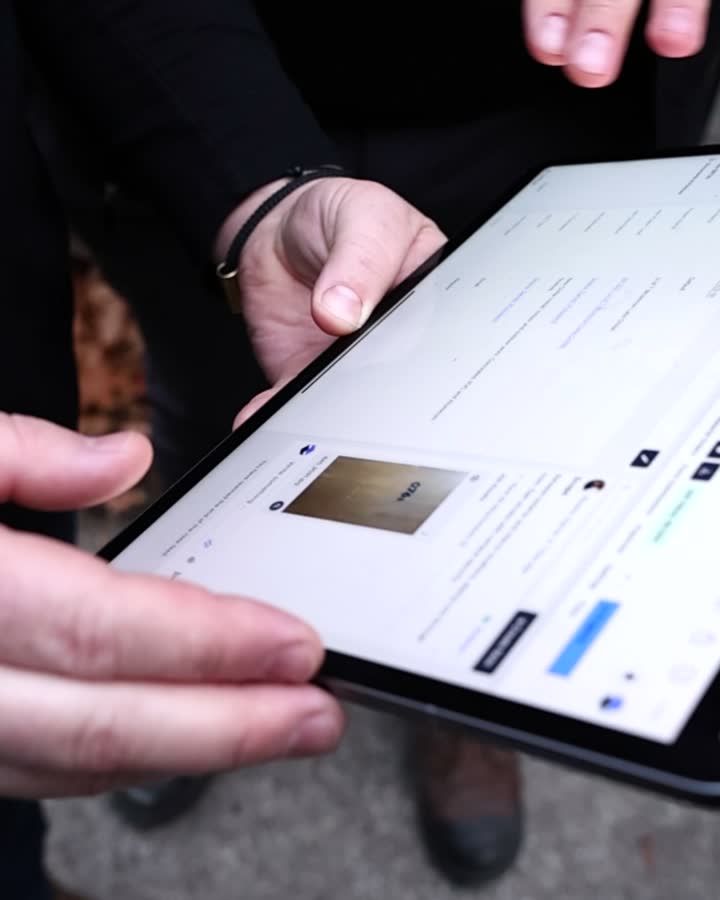
The drawing viewer runs in the browser on a tablet as well as a desktop, with its memory use tuned for iPads and phones so a full-size sheet stays open on site. The toolbar collapses out of the way when you just need to read. What the foreman marks up in the mechanical room is there when the PM opens the sheet in the office.
Footage from a real customer job.
Ask what's been marked up
Appello works natively with Claude, ChatGPT, Microsoft Copilot and Grok through the Appello connector (MCP). An assistant can list the markup on a drawing and the RFIs it points to, inside your Appello role. Every call is logged. You can delegate the work, but not the responsibility for it.
List every markup on M-301 and the RFIs they reference.
Six markups on page 1: a revision cloud, two callouts, a pin with its sticky note, a site photo and the RFI-007 area box, with RFI-007's status and due date beside it.
Appello tools:
search_annotations,search_rfisWhich open RFIs on Wing B point at a drawing?
Open RFIs on 26-014-01 that carry a drawing reference, oldest first, with the sheet each one points at.
Appello tools:
search_rfisWhich drawings on Lakeshore have markup on them?
The sheets in the Drawings folder with markup, how many items on each and the page they are on, so the PM knows which ones to open before the coordination meeting.
Appello tools:
search_annotations,search_files
In the product today
- Any PDF in a job's or project's files opens in the drawing viewer
- Shapes, clouds, callouts, text, pins, sticky notes and photos
- Markup saved automatically, with undo and redo
- Select an area to start or attach an RFI
- RFI boxes shown on the sheet
- Download PDF with the markup drawn in
- Page grid, page labels, saved rotation, zoom and fit
What it isn't
Appello's drawing viewer is for reading, marking up and asking questions about the drawings you already have. It isn't a takeoff or estimating tool, it doesn't measure or scale, and it doesn't compare two revisions of a sheet. If your estimators take off quantities in a dedicated tool, keep it; the drawings and RFIs still live on the job in Appello.
Questions about drawing markup in Appello
Do we need a separate drawing app?
Not for markup and RFIs. In Appello, any PDF in a job's files opens in the drawing viewer, with markup tools, page thumbnails, rotation and page labels. It is not a takeoff or estimating tool and it does not compare drawing revisions, so keep those tools if you use them.
Is the markup saved, or do we have to remember to save?
Saved as you go. In Appello, each markup is saved shortly after you draw or change it, and undo and redo keep the saved version in step. Close the drawing and open it tomorrow, or on another device, and the markup is where you left it.
What markup tools are there?
Rectangles, ellipses, lines, arrows, polygons, pencil and highlighter; rectangle and freehand revision clouds; cloud callouts, arrow callouts and text labels; pin markers and sticky notes; and photos, either uploaded, taken with the camera or picked from the job's files. You can change stroke width and font size.
How does a markup become an RFI?
Select an area on the sheet. Appello captures that part of the drawing as a sharp snippet from the PDF itself, and you either start a new RFI with it or attach it to an existing one. The RFI shows a box on the drawing, so anyone opening the sheet can see where the question is.
Does the markup survive the download?
Yes. Download the PDF from the viewer and Appello draws your markup onto the drawing in the file, so a consultant or GC sees the clouds and callouts in any PDF reader. The original file in the job's folder stays clean.
Can crews use it on a tablet?
Yes. The drawing viewer runs in the browser on a desktop or a tablet, with pan and zoom tools and memory limits tuned for iPads and phones so large sheets stay open. Foremen can mark up the sheet on site and the office sees the same markup.
How does it handle a 60-page drawing set?
Open the page grid to see every page as a thumbnail and jump to the one you need. Give pages their sheet numbers once with page labels, so page 7 shows as M-301 for everyone. Markup is saved page by page, and the rotation you set is remembered for the drawing.
Is it only for drawings?
No. Any PDF in a job's or project's files opens in the same viewer, so a spec section, a submittal or a GC's site plan can be marked up and pointed at by an RFI the same way. The name says drawings because that is what most people open it for.
Mark up one of your own sheets
Send us a drawing from a live job. We'll load it, mark it up with your foreman's notes and start an RFI from it.
Walk through a job in a demoA working session on your own week: your crews, your payroll rules, your jobs. Pricing for your team size afterwards.
- I have one problem to fix firstSee every modulePick the problem in front of you (payroll, scheduling, job cost, billing) and see the screens that handle it.
- I want to know where we standTake the 6-minute readiness scorecardScores payroll, job cost, scheduling, safety and how connected your systems are, which is the groundwork AI needs. You see your score in each area and a demo agenda built from your answers.
- I want the big pictureSee how Appello connects AIHow your operations data, your integrations and assistants like Claude and ChatGPT fit together.